Product questions
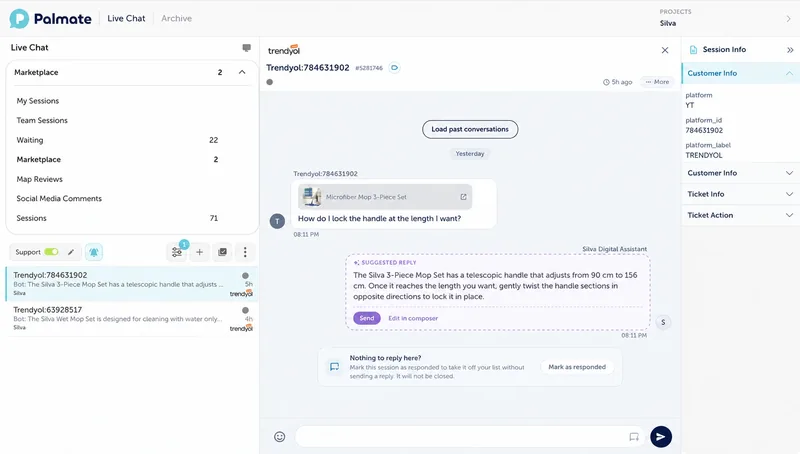
A customer asks about a size on WhatsApp. The assistant uses your connected product source and shares a product link. Stock is shown only when the connection provides that information.
An integration lets Palmate exchange information with a system you use. Bring customer messages into one place, retrieve product information and pass requests to your team.








Start with product questions, order tracking or handing a request to your team. Identify your store address, contact channel and the person responsible.
Prepare your product list, delivery terms and return rules. An authorised person approves the connection. An API lets systems exchange information; we agree on the access needed for your task.
Test valid and missing order numbers, stock questions and staff handover. Approve the answers and decide which actions are allowed and what happens if a connection fails.
After the checks, launch on your chosen channel. Track unanswered questions and unfinished tasks. Update information when your products or store rules change.
A customer asks about a size on WhatsApp. The assistant uses your connected product source and shares a product link. Stock is shown only when the connection provides that information.
A customer asks about an order. After the agreed identity check, the assistant shares its status from the connected system. If there is no match, it asks for missing details or passes the request to your team.
A customer requests an exchange. The assistant explains your store rules and collects the needed details. Decisions that require approval stay with your team.
Palmate is much more than a question-and-answer bot. It knows our product range so well that it has become the hardest-working sales assistant on our website.
Answers questions from your documents, such as delivery times and return rules. Does not access a customer’s order status.
Retrieves allowed product or order information from its source. Requires a working connection and the necessary access.
Passes exceptions, complaints and approval requests to a staff member with the conversation history.
These are the monthly prices of standard plans. Calculate extra usage and review custom connection scope on the pricing page.
| Plan | Monthly price | AI messages | Agents | Channels |
|---|---|---|---|---|
Live SupportFor human-led live chat.Available
| $30 | Live support only | 1 | 1 · Webchat |
StarterBring AI support to your website.Available
| $89 | 500 | 1 | 1 · Webchat |
StandardBring Webchat and WhatsApp together.Available
| $159 | 1,000 | 2 | 2 |
ProMore channels, more automation.Available
| $369 | 3,000 | 5 | 4 |
EliteBroader coverage for growing operations.Available
| $1,000 | 10,000 | 10 | 10 |
Subscription prices include VAT. Live Support has no AI messages or setup fee. Other plans have a one-time setup fee of $300 plus VAT. Extra usage, custom development and WhatsApp sends are charged separately. Meta fees are not included.
See all prices and inclusions